
What Are Laptop Upgrade Services?
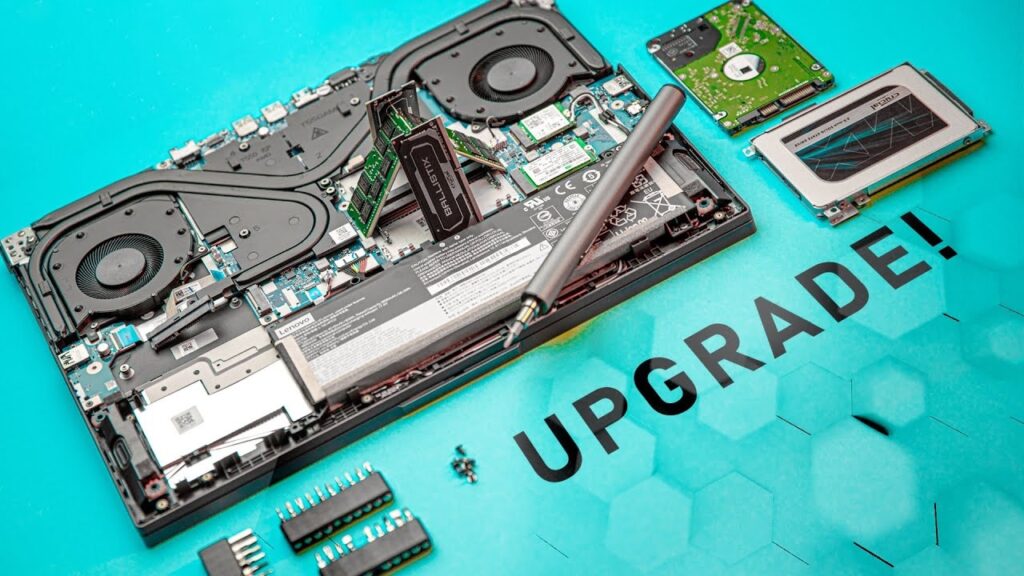
If your laptop has started slowing down, freezing, or struggling with everyday tasks, you don’t always need a new device. Laptop upgade services offer a cost-effective way to boost performance, extend lifespan, and improve productivity without the expense of buying a new machine.
In this guide, we’ll break down the cost of laptop upgrade services, their key benefits, and when you should consider upgrading.
What Are Laptop Upgrade Services?
Laptop upgrade services involve replacing or enhancing specific hardware components like:
- RAM (Random Access Memory)
- Storage (HDD to SSD or larger SSD)
- Battery
- Keyboard or cooling system
These upgrades target performance bottlenecks rather than replacing the entire device.
Most modern laptops allow upgrades to RAM and storage, while components like CPU and GPU are often soldered and difficult to upgrade.
Why Laptop Upgrade Services Are Popular
Upgrading a laptop has become increasingly popular because it:
- Improves speed and responsiveness
- Costs significantly less than buying a new laptop
- Extends the usable life of your device
In fact, upgrades typically cost 10%-25% of a new laptop, which makes them a budget-friendly option.
Laptop Upgrade Services Cost in India
The cost of laptop upgrade services depends on the component, brand, and service provider. Below is a realistic price breakdown based on current market trends.
Key Benefits of Laptop Upgrade Services
- Significant Performance Boost
Upgrading from HDD to SSD dramatically improves:
- Boot time
- App launch speed
- File transfer speed
Even older laptops feel “like new” after SSD upgrades.
- Better Multitasking
Adding more RAM allows your laptop to handle:
- Multiple browser tabs
- Video calls
- Editing software
For example:
- 8GB → Good for basic use
- 16GB → Ideal for multitasking
- 32GB → Heavy workloads
- Cost Savings
Instead of spending ₹50,000-₹1,00,000 on a new laptop, upgrades may cost:
- ₹3,000-₹10,000 for major improvements
This makes laptop upgrade services highly economical.
- Extended Laptop Lifespan
A well-maintained laptop can last 5-10 years, especially with timely upgrades.
- Improved Productivity
Faster systems reduce:
- Waiting time
- System crashes
- Workflow interruptions
This is especially useful for professionals and students.
Types of Laptop Upgrades Explained
RAM Upgrade
Best for: Multitasking and smooth performance
Upgrade RAM if:
- Laptop freezes with multiple apps
- The browser slows down with many tabs
- System crashes frequently
SSD Upgrade
Best for: Speed improvement
Upgrade to SSD if:
- Laptop takes a long time to boot
- Apps open slowly
- Disk usage is constantly high
Switching from HDD to SSD offers the biggest performance gain.
Battery Replacement
Best for: Portability
Consider this if:
- Battery drains quickly
- Laptop shuts down unexpectedly
Other Upgrades
- Cooling system improvements
- Keyboard replacement
- Thermal paste reapplication
When Do You Need Laptop Upgrade Services?
Knowing the right time to upgrade is critical.
- Slow Performance
If your laptop:
- Takes minutes to start
- Lags during basic tasks
An SSD or RAM upgrade is usually enough.
- Multitasking Issues
If your system:
- Freezes with multiple apps
- Struggles with video calls + browsing
You likely need more RAM.
- Storage Limitations
Upgrade storage if:
- You constantly run out of space
- Files load slowly
- Aging Hardware (But Still Functional)
If your laptop is:
- 3-6 years old
- Still working fine, but slow
Upgrading makes more sense than replacing.
- Budget Constraints
If buying a new laptop isn’t feasible, upgrading offers a practical solution.
When NOT to Upgrade Your Laptop
Laptop upgrade services are not always the best option.
Avoid upgrading if:
- The laptop is over 8-10 years old
- CPU performance is outdated
- Motherboard limits upgrades
- Repair costs exceed 50% of a new laptop
In such cases, buying a new device is more practical.
Laptop Upgrade vs New Laptop: Quick Comparison
Factor | Upgrade | New Laptop |
Cost | Low (₹3K–₹10K) | High (₹40K+) |
Performance Gain | Moderate to high | Maximum |
Lifespan | +2–4 years | 5+ years |
Best For | Budget users | Heavy users |
DIY vs Professional Laptop Upgrade Services
DIY Upgrade
Pros:
- Saves service cost
- Learning experience
Cons:
- Risk of damage
- Compatibility issues
Tips Before Choosing Laptop Upgrade Services
- Check compatibility (RAM type, SSD slot)
- Identify the bottleneck (RAM vs SSD)
- Backup your data
- Compare the upgrade cost vs. the new laptop
- Choose a trusted service provider
Final Thoughts
Laptop upgrade services are one of the smartest ways to improve performance without overspending. Whether it’s adding RAM, switching to an SSD, or replacing a battery, these upgrades can transform a slow device into a fast and efficient machine.
If you’re looking for reliable and professional laptop upgrade services, visit Laptop World today to upgrade your laptop and experience faster, smoother performance.